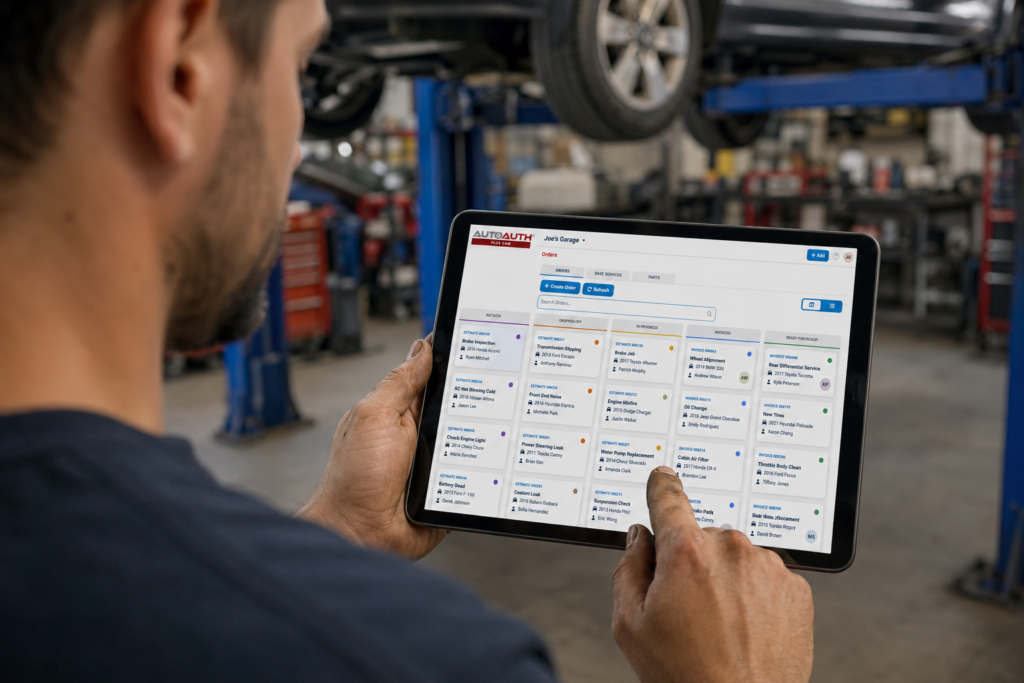
AutoAuth PLUS CRM (Shop Management) gives you customer, vehicle, service order, scheduling, communication, estimate, and invoice tools inside the same system your shop already uses for secure vehicle access.
Many shops manage their day across multiple tools, paper notes, spreadsheets, calendars, and disconnected customer records.
That makes it harder to stay organized, communicate with customers, track work, and move jobs through the shop.
THE SOLUTION
One System for Access and Shop Operations
AutoAuth PLUS CRM (Shop Management) brings shop operations into the same system shops already trust for secure vehicle access. Instead of adding another disconnected tool, shops can manage the full job lifecycle in AutoAuth.
Run Your Entire Shop from One Platform
Manage authenticated diagnostics, repair orders, scheduling, estimates, invoicing, and customer communications—all from one integrated system.
Keep Customers Connected
Send automated appointment reminders, estimate approvals, and service updates while managing every customer conversation from a centralized inbox.
Manage Every Job from Appointment to Payment
Schedule appointments, create repair orders, track job progress, and generate estimates and invoices through every stage of the repair process.
Stay on Top of Shop Operations
Monitor technician workloads, shop activity, and repair status in real time to keep work flowing efficiently.
Build Your Parts & Services Catalog
Create reusable parts, labor, and service templates to produce faster, more consistent estimates and reduce repetitive data entry.
Create Professional Estimates & Invoices
Quickly create, print, email, and manage professional estimates and invoices to speed approvals and get paid faster.
Easy To Use And Easy To Upgrade
Built Into the System You Already Use
AutoAuth PLUS CRM (Shop Management) is different because it is connected to a system already used by hundreds of thousands of shops for secure vehicle access.
How is AutoAuth PLUS CRM (Shop Management) different from AutoAuth?
As vehicle security has evolved, AutoAuth works with OEMs and independent tool vendors to ensure that only authenticated tools and technicians can perform protected functions. At the same time, AutoAuth connects that access directly to shop operations—linking vehicle work to customers, service orders, scheduling, and billing. This allows independent shops to not only unlock and diagnose modern vehicles safely and without disruption, but also to run their day-to-day operations in the same system.
If we already use AutoAuth, how do we get started with AutoAuth PLUS CRM (Shop Management)?
Most shops start with secure vehicle access and then expand to full shop management. From there, they can upgrade to better reporting, more visibility, and full shop management through AutoAuth PLUS CRM (Shop Management).
How does AutoAuth PLUS CRM (Shop Management) improve workflow automation?
With AutoAuth PLUS CRM (Shop Management), everything is connected—from vehicle access and diagnostics to job tracking, customer communication, scheduling, estimates, and invoices—giving shops one place to manage both the work and the business.
Is AutoAuth PLUS CRM (Shop Management) easy to use?
AutoAuth PLUS CRM (Shop Mangement) is easy to use with minimal training. It works with the tools shops already have and was built for technicians, not IT teams.
Does AutoAuth have an Enterprise-level plan?
Yes, the Enterprise plan offers all PLUS features + Identity Management System and Bulk Import. Contact us for more information.
I have additional questions. How can I contact support?
You can find answers to common questions about account setup, login, shop registration, tools, users, billing, reports etc. by visiting the AutoAuth Help Center.